Linking Together
Once you’ve added the Barrel and Magazine objects to your weapon prefab, the next step is to connect them so they work as one system. Everything is linked from the Weapon script on the root, so the barrel and the magazine don’t need to know about each other.
🔫 Weapon Root ↔ Barrel & Magazine
The main Weapon script should live on the root of your weapon prefab. This script manages player input, ammo and overall weapon state.
To complete the setup:
- Select the root of the prefab.
- In the weapon component, assign the Barrel GameObject to the appropriate field. This tells the weapon when and how to fire.
- Assign the Magazine GameObject to the Magazine field. This lets the weapon read how many bullets are available, consume ammo and reload.
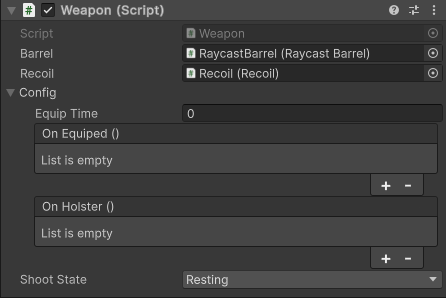
Leave Magazine empty for infinite ammo. Assign the same magazine to several weapons to make them share ammo.
Recoil needs no link: the Recoil component listens to the barrels under it by itself. See Handling Recoil.
Make sure all references are assigned properly before testing your weapon in the scene.
Once linked, the weapon can:
- Trigger the barrel when input is received
- Prevent firing when out of ammo
- Tell the magazine to consume ammo or reload
This linking structure is simple but essential to ensure everything works smoothly.
⏭️ Next Step
That’s is pretty much how to setup a basic weapon prefab that you can config and customize. We have covered the basics so now you can reuse this process to make more complex weapons. Now one thing we didn’t cover is the recoil and how it works.