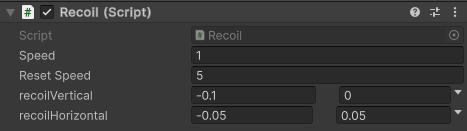
Handling Recoil
The Recoil component is responsible for applying camera or weapon shake whenever the weapon is fired. It should be attached to the Recoil GameObject under your weapon prefab. It listens to the barrel’s shots by itself, so it doesn’t need to be linked in the Weapon script.
🔗 Integration
To enable recoil in your weapon:
- Make sure your weapon prefab has a child GameObject named
Recoil. - Attach the
Recoilscript to that object. - Leave its Barrel field empty to follow every barrel under it, or assign one barrel to follow only that one.
- Test your weapon and tweak values to get the desired effect.