Weapon Component
Add Component: Glowing Rifts > Modular Weapon > Weapon
The Weapon script is the brain of your weapon prefab. It is recommend to place it on the root GameObject of the weapon. Its primary responsibilities are:
- Handling player input
- Managing the weapon’s firing state
- Connecting the barrel and the magazine
- Broadcasting events like equip and holster
⚙️ Inspector Overview
Here’s a breakdown of each field:
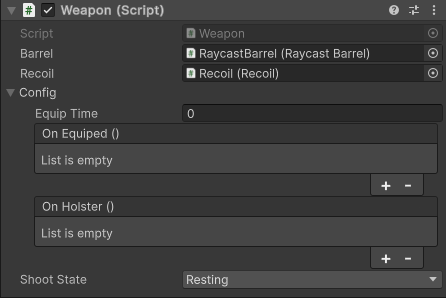
Barrel
A reference to the barrel component (e.g., RaycastBarrel). This tells the weapon which barrel to use when firing.
Magazine
The magazine the weapon draws ammo from. Leave it empty for infinite ammo.
Tip
Assign the same magazine to several weapons to make them share ammo.
Note
The magazine used to live on the barrel. It is now assigned on the weapon, and the weapon tells the magazine when to consume ammo or reload.
Use Built In Input
Reads the built-in WeaponControls bindings (shoot and reload). Disable it when another script drives StartShooting, StopShooting and Reload (custom input, AI or networking).
Events
OnEquipped (UnityEvent)
This event is invoked when the weapon has finished equipping. You can use it to trigger animations, sounds, or logic.
Tip
Use this to hook animations, sounds, VFX in the inspector
OnHolster (UnityEvent)
This event is triggered when the weapon is holstered. Use it for hiding the weapon, stopping effects, etc.
Tip
Use this to hook or trigger animations, sounds, VFX in the inspector as well
Shoot State
Shows the current state of the weapon. This is useful for debugging and includes states like:
RestingShootingReloading
Note
This is internal to for the barrel and magazine know what’s the state of the weapon
💡 Usage Tips
- Place this script on the root GameObject of your weapon prefab.
- Make sure to assign a barrel for the weapon to function. A magazine is optional.
- Recoil no longer needs a reference on the weapon: the Recoil component listens to the barrel’s events itself.
- Use UnityEvents to easily hook up animation or sound triggers without modifying code.
✅ Required For
✅ Functional shooting
✅ Input management
✅ State transitions
✅ Ammo management
✅ Barrel connection