Barrel Component
The Barrel is the component responsible for handling all firing logic in your modular weapon system. It’s the part of the weapon that defines how bullets are shot: whether hitscan, projectile, or otherwise.
All barrel types inherit from a common base class, allowing for consistent structure and extendability. This page will cover the base barrel features, followed by specific behavior of each subtype.
Caution
The base barrel shares common functionality with the inhereted barrel type, but you can’t add it as a component on it’s own. It was mainly made to provide logic to the child classes.
🧱 Base Barrel Features
Regardless of the firing style, all barrels expose the following configuration:
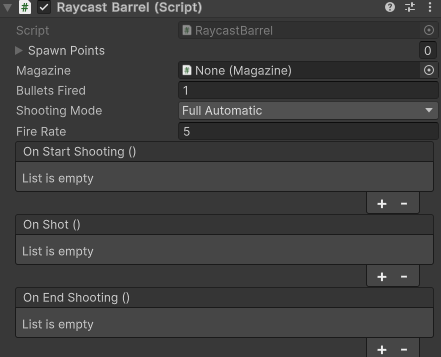
Config
The barrel’s firing stats. They live on the barrel itself, so a barrel works without any extra assets.
| Field | Description |
|---|---|
| Bullets Fired | Bullets fired per shot. Also the ammo one shot uses. |
| Fire Rate | Shots per second. |
| Damage | Damage per bullet. Set it to a range (two constants or two curves) to roll a random value per bullet. |
Tip
To change these stats at runtime (power-ups, upgrade levels), create a Barrel Config asset and apply it with barrel.ApplyConfig(config).
Spawn Points
A list of Transform points where projectiles or raycasts originate.
Tip
Each bullet of a shot takes the next point in order, and the next shot starts on the following point. This lets one barrel alternate between muzzles or fire from all of them at once.
Tip
To change the muzzle layout at runtime, for example more muzzles at a higher level, call barrel.SetSpawnPoints(points).
Note
Having 0 referenced points means that the bullet will shoot from the barrel’s position
Events
The barrel’s events are grouped under Events so they fold away in the inspector. These hooks allow for easy integration of animation, VFX, SFX, and additional logic:
- On Start Shooting: Called once when the trigger is pulled (good for animations or initial effects).
- On Shot: Called every time a shot is fired.
- On End Shooting: Called once when shooting stops (good for looping effects or wind-down animations).
Note
The barrel no longer references a magazine. Ammo is assigned on the Weapon, and a weapon without a magazine has infinite ammo.
Barrel Modifiers
Components added next to the barrel on the same GameObject that hook into it before every shooting and when the trigger is released. A modifier can hold the shot until it is ready, or cancel it.
- Firing Mode sets semi automatic, burst or full automatic fire.
- Spool adds a wind-up before firing and a wind-down after, for miniguns or charged lasers.
- Without any modifier, the barrel fires full automatic as soon as the trigger is pulled.
🚀 Other Barrel Types
We’ll cover these in dedicated sections:
- Raycast Barrel
- Projectile Barrel
- Shotgun Barrel
- Laser Barrel
- Firing Mode (barrel modifier)
- Spool (barrel modifier)
Each extends the base functionality with unique mechanics and impact logic.